



Discovery calls, demos, follow-ups, onboarding handoffs, all of it happens in voice. But when you open the CRM later, what do you usually see? A short summary. A few bullet points. Sometimes almost nothing.
That is not because reps do not care. It is because after a full day of back-to-back calls, nobody wants to write a mini report for every meeting.
So the most useful parts of customer conversations often get lost: – real objections – buying signals – feature requests – hidden blockers that do not show up in form fields
The recording exists. The insight does too. It just never makes it into structured CRM data.
Why Sales Call Recordings Still Go Unused
Most teams already record calls with VoIP systems, Zoom, or CRM dialers. Capturing audio is easy.
The hard part comes after.
A single sales call can run 30 to 60 minutes. Reviewing that recording takes time, and manual note-taking is usually the first thing people skip when pipelines get busy.
Result: recordings pile up, CRM records stay thin, and your team starts making decisions based on partial information.
If you want cleaner pipeline data, better coaching, and fewer “what happened on that call?” moments, this gap has to be fixed.
Where AI Transcription Changes the Game
AI transcription turns raw calls into searchable text. That sounds simple, but it changes how sales documentation works.
Instead of replaying full recordings, reps and managers can scan transcripts, jump to key moments, and capture what actually matters.
Many teams start with an AI transcription tool to turn call recordings into transcripts, then pass that transcript into their CRM workflow.
Once the call is text, you can do things that are painful with audio: – search by keyword – extract specific customer concerns – auto-generate summaries – map insights into structured CRM fields
That is the difference between “we recorded it” and “we can actually use it.”
A Practical Workflow: Recording to CRM Update
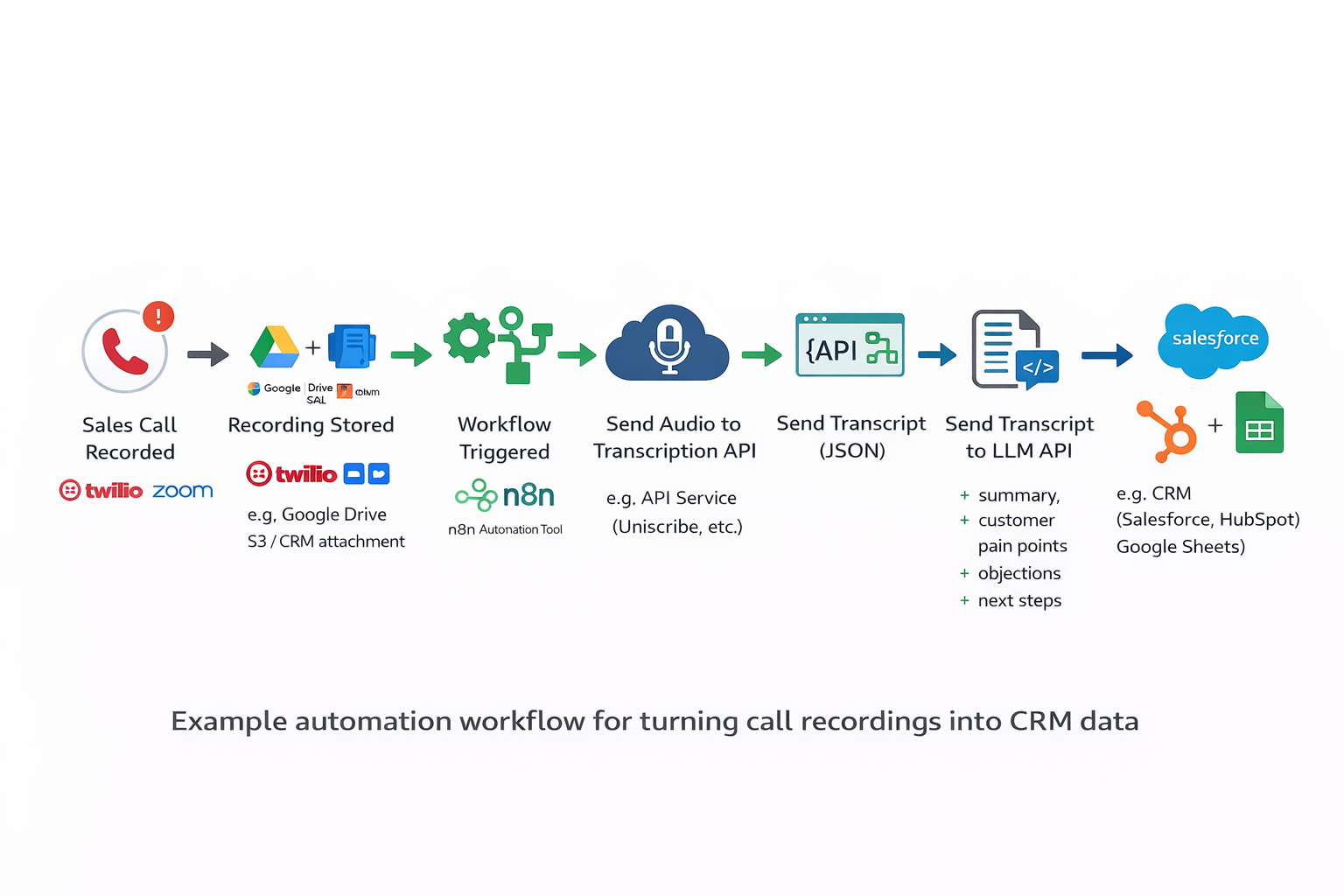
You do not need a complicated architecture to make this work. A lightweight pipeline is enough.
A common setup looks like this:
1. Record calls in Zoom or your call platform.
2. Save recordings automatically to cloud storage.
3. Trigger automation when a new file appears.
4. Transcribe audio through API.
5. Extract structured insights with an LLM.
6. Push those insights to CRM fields.
Step 1: Record Sales Conversations
Use the call tools your team already relies on: VoIP systems, Zoom, or CRM-integrated dialers.
No process change needed here. You are already creating the raw input.
Step 2: Save Recordings to a Predictable Location
Store every recording in one place your automation can monitor, for example: – Google Drive – Amazon S3 – CRM file storage – your meeting platform’s recording folder
Predictable storage is important. If files land in random places, the rest of the workflow breaks.
Step 3: Trigger Automation on New Files
Use n8n, Zapier, or Make to watch that folder.
When a new recording appears, kick off the workflow automatically. No manual upload. No “I will do it later.”
Step 4: Send the Audio to a Transcription API
Your automation sends the file to a transcription endpoint and receives a transcript (usually JSON plus plain text).
That transcript becomes the source of truth for downstream analysis.
Step 5: Extract CRM-Ready Insights with a Language Model
Now parse the transcript into the fields your team actually uses.
Typical outputs include: – call summary – customer pain points – objections raised – agreed next steps – requested product features
The key is mapping extraction prompts to your CRM schema, not generating a generic paragraph nobody reads.
Step 6: Write Structured Data Back to the CRM
Push extracted fields directly into: – meeting summaries – deal notes – follow-up tasks – opportunity stage updates
Some teams also attach the full transcript to the opportunity record, so anyone can verify context later.
Compared with manual notes, this is usually more complete, more consistent, and much easier to audit.
What Sales Teams Get from This
When transcripts are part of the normal workflow, documentation quality improves fast.
Reps stop relying on memory. Managers can review what happened without listening to hours of recordings. Revenue leaders get cleaner data for forecasting and coaching.
Over time, another benefit shows up: pattern visibility.
You start seeing repeated objections, recurring competitor mentions, and common feature asks across dozens of calls. That feedback is useful far beyond sales. Product, onboarding, and marketing can all use it.
Final Takeaway
Recording calls is not the hard part anymore. Turning those conversations into usable CRM knowledge is.
AI transcription plus simple automation closes that gap.
If your team already records calls, you are sitting on valuable data. The opportunity is to stop treating recordings like archives and start treating them like structured sales input.